
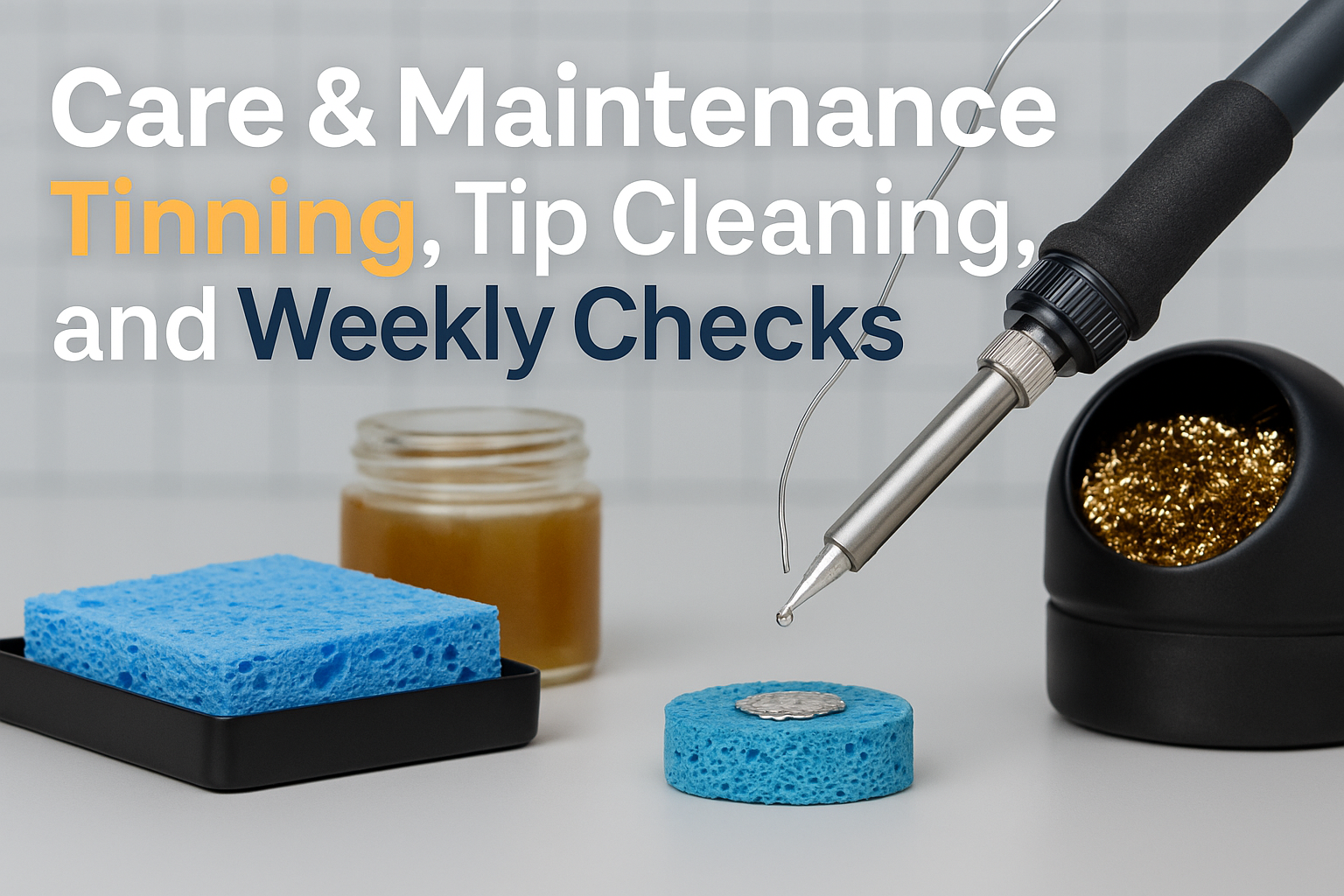
Care & Maintenance: Tinning, Tip Cleaning, and Weekly Checks
Last month, I watched a seasoned electronics engineer throw away what looked like a perfectly good soldering iron. When I asked why, he showed me the tip – completely oxidized, pitted, and beyond salvation. “Three months of neglect,” he said with a grimace. “Could have lasted three years with proper care.” That moment crystallized something I’d been preaching for years: your soldering equipment is only as good as the maintenance you give it.
Whether you’re a weekend hobbyist or a professional engineer working on critical circuits, proper soldering iron maintenance isn’t just about saving money – it’s about ensuring consistent, reliable joints that won’t fail when it matters most. In this comprehensive guide, I’ll walk you through the essential maintenance practices that will keep your soldering equipment performing at its peak for years to come.
Key Takeaways
• Daily tinning prevents oxidation and extends tip life by 300-500%
• Proper cleaning techniques using damp sponges and brass wool maintain optimal heat transfer
• Weekly maintenance checks catch problems early before they become expensive repairs
• Temperature control and storage practices significantly impact equipment longevity
• Systematic maintenance routines reduce downtime and improve soldering quality
Understanding Soldering Iron Maintenance Fundamentals
Soldering iron maintenance revolves around three core principles: preventing oxidation, maintaining thermal efficiency, and preserving mechanical integrity. When you understand these principles, every maintenance task becomes purposeful rather than routine busywork.
The tip of your soldering iron operates in an extremely harsh environment. At temperatures ranging from 300°C to 400°C (572°F to 752°F), it’s constantly exposed to oxygen, flux residues, and thermal cycling. Without proper care, even the highest-quality tips will deteriorate rapidly.
Modern soldering stations like those from XYTRONIC offer advanced temperature control that helps minimize thermal stress, but they still require diligent maintenance to perform optimally.
The Science Behind Tip Degradation
Oxidation occurs when iron molecules react with oxygen at high temperatures, forming iron oxide (rust). This process accelerates exponentially as temperature increases. A tip left unprotected at 350°C will develop significant oxidation within minutes, while the same tip properly tinned can operate for hours without degradation.
Daily Tinning: Your First Line of Defense
Tinning – coating your soldering tip with a thin layer of fresh solder – is the single most important maintenance task you can perform. I recommend tinning at three critical times: before use, during extended sessions, and immediately after use.
Pre-Session Tinning Process
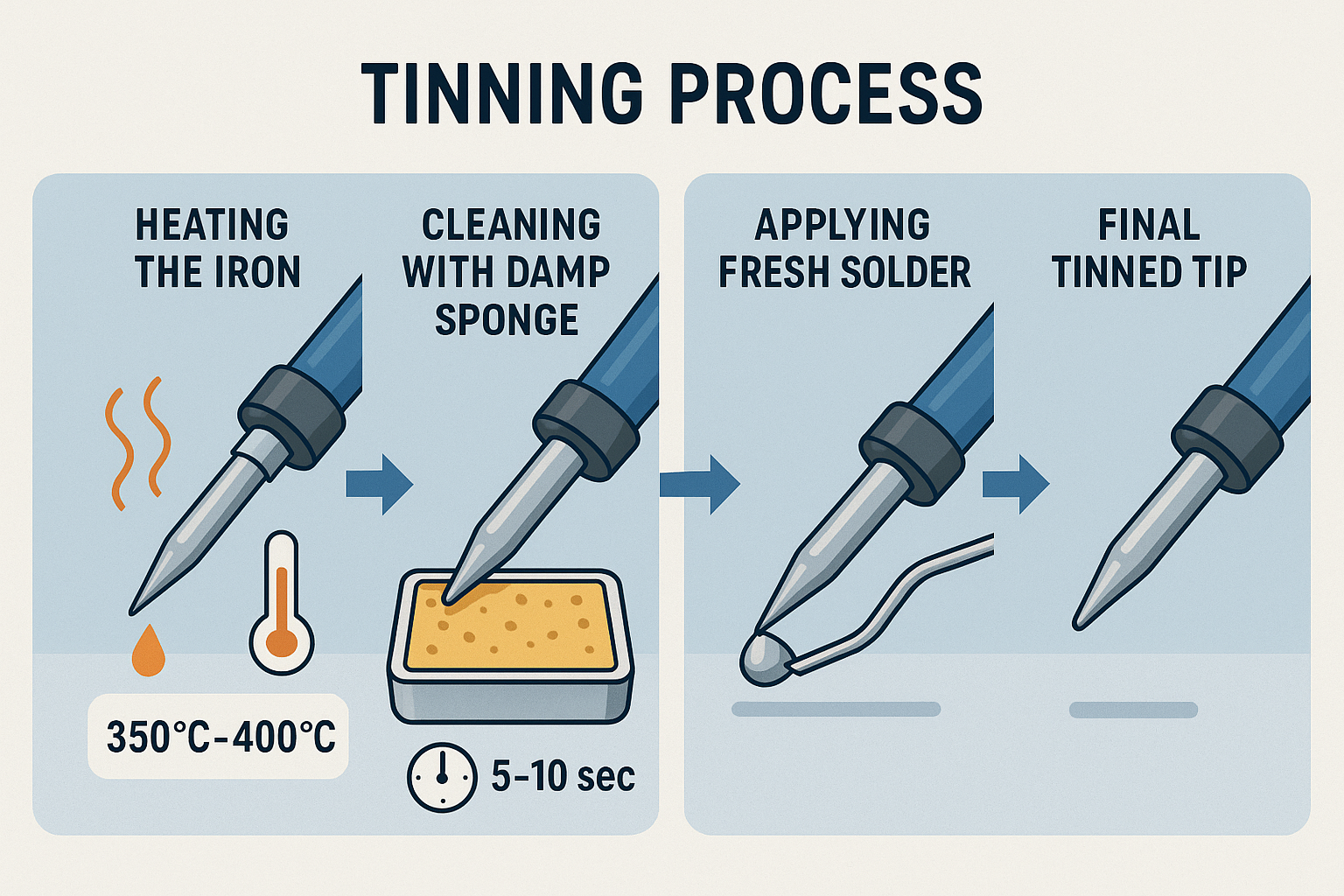
- Heat your iron to working temperature (typically 350°C for leaded solder)
- Clean the tip with a damp sponge to remove any oxidation
- Apply fresh solder immediately while the tip is still hot
- Wipe excess on a damp sponge, leaving a thin, shiny coating
The key is timing. Solder should flow smoothly and wet the entire tip surface. If solder beads up or doesn’t flow properly, your tip may already have oxidation that requires more aggressive cleaning.
During-Session Maintenance
For extended soldering sessions lasting more than 30 minutes, refresh the tinning every 15-20 joints. This prevents flux buildup and maintains optimal heat transfer. Different tip shapes may require slightly different tinning approaches, but the principle remains the same.
Post-Session Protection
Never turn off your iron with a clean, untinned tip. Always apply a generous coating of fresh solder before powering down. This protective layer will prevent oxidation during storage and make your next session start smoothly.
“A well-tinned tip is like a good insurance policy – you don’t appreciate it until you need it, but when you do, it saves you from expensive problems.” – Master Electronics Technician, 25+ years experience
Tip Cleaning Techniques and Best Practices
Effective tip cleaning requires the right tools and techniques. The goal is removing contaminants without damaging the tip’s plating or geometry.
Cleaning Tools and Their Applications
Damp Sponge Method:
- Use natural cellulose sponges (avoid synthetic materials)
- Keep barely damp – not soaking wet
- Clean with gentle wiping motions, not aggressive scrubbing
- Replace sponges weekly or when they show signs of degradation
Brass Wool Cleaning:
- Ideal for stubborn flux residues and light oxidation
- Use gentle circular motions to avoid scratching
- Follow immediately with fresh tinning
- Replace brass wool when it becomes compacted or dirty
Tip Cleaning Paste:
- Reserve for heavily oxidized tips that don’t respond to normal cleaning
- Apply sparingly with the iron at working temperature
- Work the paste gently with brass wool
- Thoroughly tin immediately after cleaning
Common Cleaning Mistakes to Avoid
❌ Using abrasive materials like sandpaper or steel wool
❌ Cleaning cold tips – always clean at working temperature
❌ Over-wetting sponges – excess water causes thermal shock
❌ Delaying tinning after cleaning – oxidation begins immediately
Weekly Maintenance Checks: Preventing Problems Before They Start
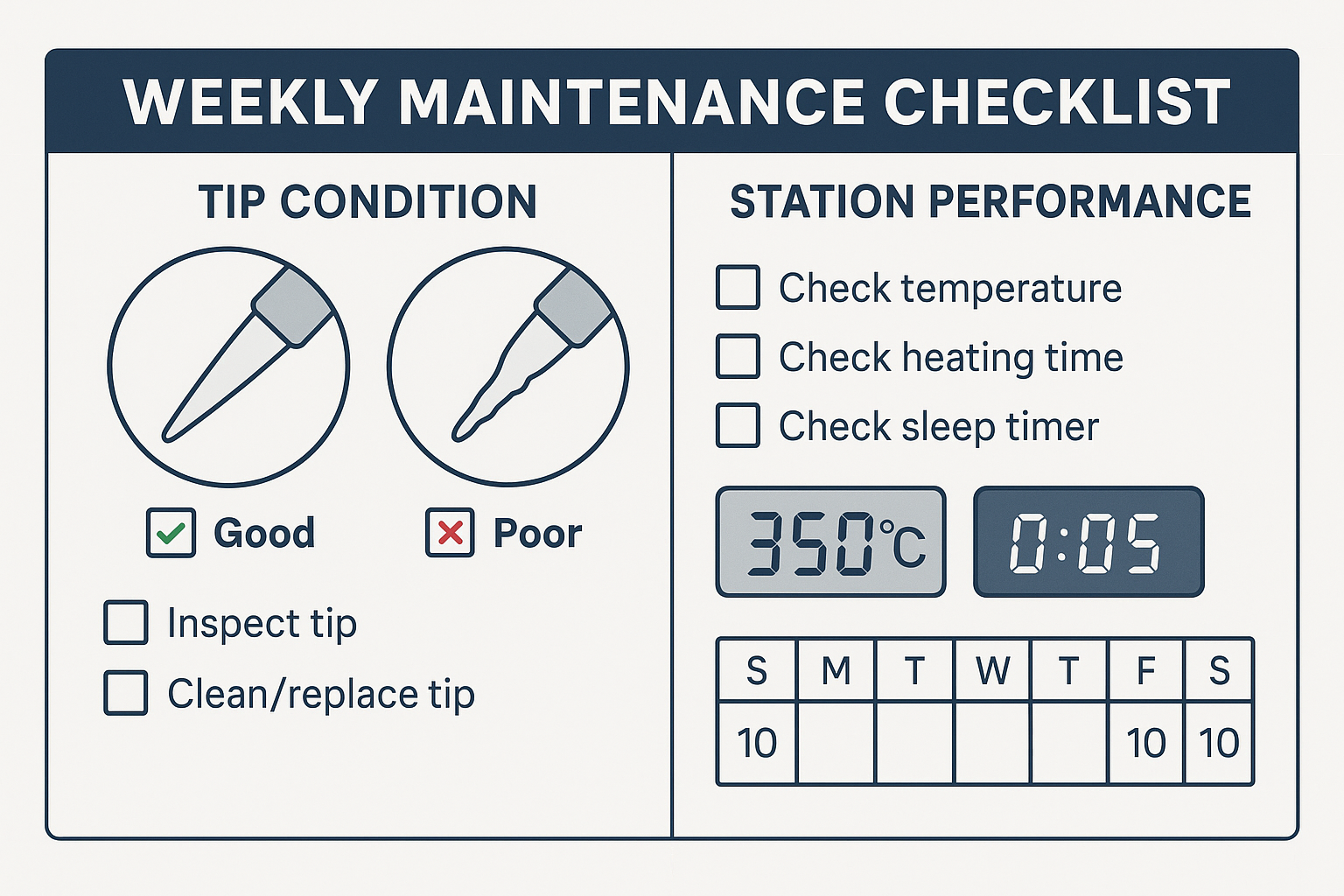
Implementing a systematic weekly maintenance routine catches problems early and ensures consistent performance. I’ve developed a checklist that takes less than 10 minutes but can prevent hours of troubleshooting.
Weekly Inspection Checklist
Tip Condition Assessment:
- [ ] Check for pitting or erosion on the tip surface
- [ ] Verify proper solder wetting across the entire tip
- [ ] Inspect for geometric changes that affect joint formation
- [ ] Test heat transfer efficiency with a standard joint
Station Performance Verification:
- [ ] Confirm temperature accuracy with a calibrated thermometer
- [ ] Test heating time from room temperature to working temperature
- [ ] Verify temperature stability during operation
- [ ] Check auto-sleep and shutoff functions if equipped
Connection and Cable Inspection:
- [ ] Examine handpiece cable for cracks or damage
- [ ] Test connection security at all junction points
- [ ] Verify proper grounding for ESD protection
- [ ] Check stand stability and tip holder condition
Documentation and Record Keeping
Maintain a simple log of your weekly checks. Note any changes in performance, tip condition, or unusual observations. This historical data helps identify patterns and predict when components need replacement.
| Date | Tip Condition | Temp Accuracy | Notes |
|——|—————|—————|——-|
| 2025-01-07 | Good | ±2°C | Normal operation |
| 2025-01-14 | Fair | ±3°C | Slight oxidation, cleaned |
| 2025-01-21 | Good | ±2°C | New tip installed |
Advanced Maintenance Procedures
Deep Cleaning Protocols
Monthly deep cleaning removes accumulated contaminants that daily maintenance might miss. This process requires more time but significantly extends equipment life.
Complete Disassembly Cleaning:
- Power down and allow complete cooling
- Disassemble removable components according to manufacturer instructions
- Clean heating element housing with appropriate solvents
- Inspect internal connections for corrosion or damage
- Reassemble with proper torque specifications
Calibration and Performance Testing
Quarterly calibration ensures your temperature readings remain accurate. Temperature control is critical for consistent results, especially when working with modern lead-free solders.
Use a calibrated thermometer or thermocouple to verify your station’s accuracy across its operating range. Most quality stations should maintain ±5°C accuracy throughout their usable temperature range.
Equipment Storage and Environmental Considerations
Proper storage significantly impacts equipment longevity. Environmental factors like humidity, temperature fluctuations, and air quality all affect your soldering equipment.
Optimal Storage Conditions
Temperature: Store in environments between 15-25°C (59-77°F)
Humidity: Maintain 30-50% relative humidity to prevent corrosion
Air Quality: Minimize exposure to corrosive gases and dust
Physical Protection: Use protective covers when equipment isn’t in use
Long-Term Storage Protocol
For equipment that won’t be used for extended periods:
- Clean thoroughly and apply heavy tinning
- Remove from humid environments
- Store in protective cases with desiccant if necessary
- Perform monthly checks even during storage periods
Troubleshooting Common Maintenance Issues
Poor Solder Wetting
Symptoms: Solder beads up on tip, doesn’t flow smoothly
Causes: Oxidation, contamination, or worn plating
Solutions: Progressive cleaning from gentle to aggressive methods
Inconsistent Temperature
Symptoms: Variable heating, slow temperature recovery
Causes: Dirty connections, worn heating elements, or calibration drift
Solutions: Connection cleaning, element replacement, or professional calibration
Premature Tip Wear
Symptoms: Rapid pitting, erosion, or geometry changes
Causes: Excessive temperature, poor cleaning techniques, or chemical incompatibility
Solutions: Temperature optimization, technique improvement, or tip material selection
Safety Considerations in Maintenance
Maintenance activities involve hot surfaces, electrical components, and potentially hazardous chemicals. Following proper safety protocols protects both you and your equipment.
Personal Protection
- Always disconnect power before internal cleaning
- Use appropriate PPE including safety glasses and heat-resistant gloves
- Ensure adequate ventilation when using cleaning solvents
- Maintain ESD protection during all maintenance activities
Equipment Protection
Modern soldering stations often include ESD protection features that can be compromised by improper maintenance. Always follow manufacturer guidelines for cleaning and service procedures.
Cost-Benefit Analysis of Proper Maintenance
The economics of maintenance are compelling. A quality soldering tip costs $15-30 but can last 2-3 years with proper care versus 2-3 months with neglect. For professional users, the cost of downtime often exceeds the cost of replacement parts by orders of magnitude.
Maintenance Investment vs. Replacement Costs
Annual Maintenance Costs:
- Cleaning supplies: $20-30
- Replacement tips (proper care): $30-50
- Time investment: 4-6 hours
Annual Replacement Costs (poor maintenance):
- Tips: $150-300
- Potential equipment damage: $200-500
- Downtime costs: $500-2000
The return on investment for proper maintenance typically exceeds 500% for professional users and 200% for serious hobbyists.
Building Your Maintenance Routine
Success in soldering iron maintenance comes from consistency, not perfection. Start with the essential daily practices and gradually incorporate more comprehensive procedures as they become habitual.
Beginner Routine (5 minutes daily)
- Pre-session tinning
- Basic tip cleaning
- Post-session protection
Intermediate Routine (15 minutes weekly)
- All beginner tasks
- Weekly inspection checklist
- Performance verification
- Basic record keeping
Advanced Routine (30 minutes monthly)
- All previous tasks
- Deep cleaning procedures
- Calibration verification
- Comprehensive documentation
Ready to invest in equipment that rewards proper maintenance? Shop XYTRONIC soldering stations that are designed for longevity and consistent performance when properly maintained.
Seasonal Maintenance Considerations
Environmental changes throughout the year require adjustments to your maintenance routine. Winter heating and summer humidity create different challenges for equipment preservation.
Winter Considerations:
- Increased static electricity requires enhanced ESD precautions
- Dry air can cause faster oxidation
- Temperature fluctuations stress components
Summer Considerations:
- Higher humidity accelerates corrosion
- Increased cooling demands on equipment
- More frequent cleaning due to dust and contaminants
Professional vs. Hobbyist Maintenance Approaches
The maintenance approach should scale with usage intensity and criticality of work. Different user profiles require different maintenance strategies.
Professional Requirements:
- Daily documentation
- Calibrated test equipment
- Redundant backup systems
- Scheduled preventive maintenance
Hobbyist Approach:
- Weekly visual inspections
- Basic cleaning supplies
- Simple record keeping
- Reactive maintenance as needed
Integration with Modern Soldering Stations
Modern soldering stations offer features that support maintenance efforts. Auto-sleep and shutoff functions reduce thermal stress during idle periods, while temperature memory functions ensure consistent settings.
Understanding how to leverage these features maximizes their benefit:
- Program auto-sleep for your typical work patterns
- Use temperature presets to avoid overheating
- Monitor actual vs. set temperatures during maintenance checks
Conclusion
Proper soldering iron maintenance isn’t just about preserving equipment – it’s about ensuring the reliability and quality of your work. Through consistent daily tinning, effective cleaning techniques, and systematic weekly checks, you can extend equipment life by 300-500% while maintaining peak performance.
The key is developing sustainable routines that fit your workflow and usage patterns. Start with the basics: tin before and after each session, clean properly during use, and perform weekly visual inspections. As these practices become habitual, gradually incorporate more comprehensive maintenance procedures.
Remember that maintenance is an investment, not an expense. The time and materials you invest in proper care will be returned many times over through reduced replacement costs, improved reliability, and better soldering results.
Your next steps:
- Assess your current maintenance practices against the guidelines in this article
- Implement daily tinning and cleaning routines immediately
- Schedule weekly maintenance checks in your calendar
- Invest in proper cleaning supplies and tools
- Begin documenting your maintenance activities
For more insights on soldering techniques and equipment optimization, explore our comprehensive soldering resources and discover how proper maintenance integrates with overall soldering excellence.