
Picture this: You’re working on a delicate circuit board, carefully placing components that cost hundreds of dollars. One wrong move with an overheated soldering iron, and you’ve just turned expensive electronics into scrap metal. 🔥 This scenario happens more often than you’d think, and it’s exactly why understanding temperature control in your XYTRONIC station isn’t just helpful—it’s absolutely critical for every electronics engineer and hobbyist.
Key Takeaways
• Precise temperature control prevents component damage and ensures reliable solder joints across different materials and component types
• XYTRONIC stations offer superior thermal stability compared to basic irons, maintaining consistent heat even during extended use
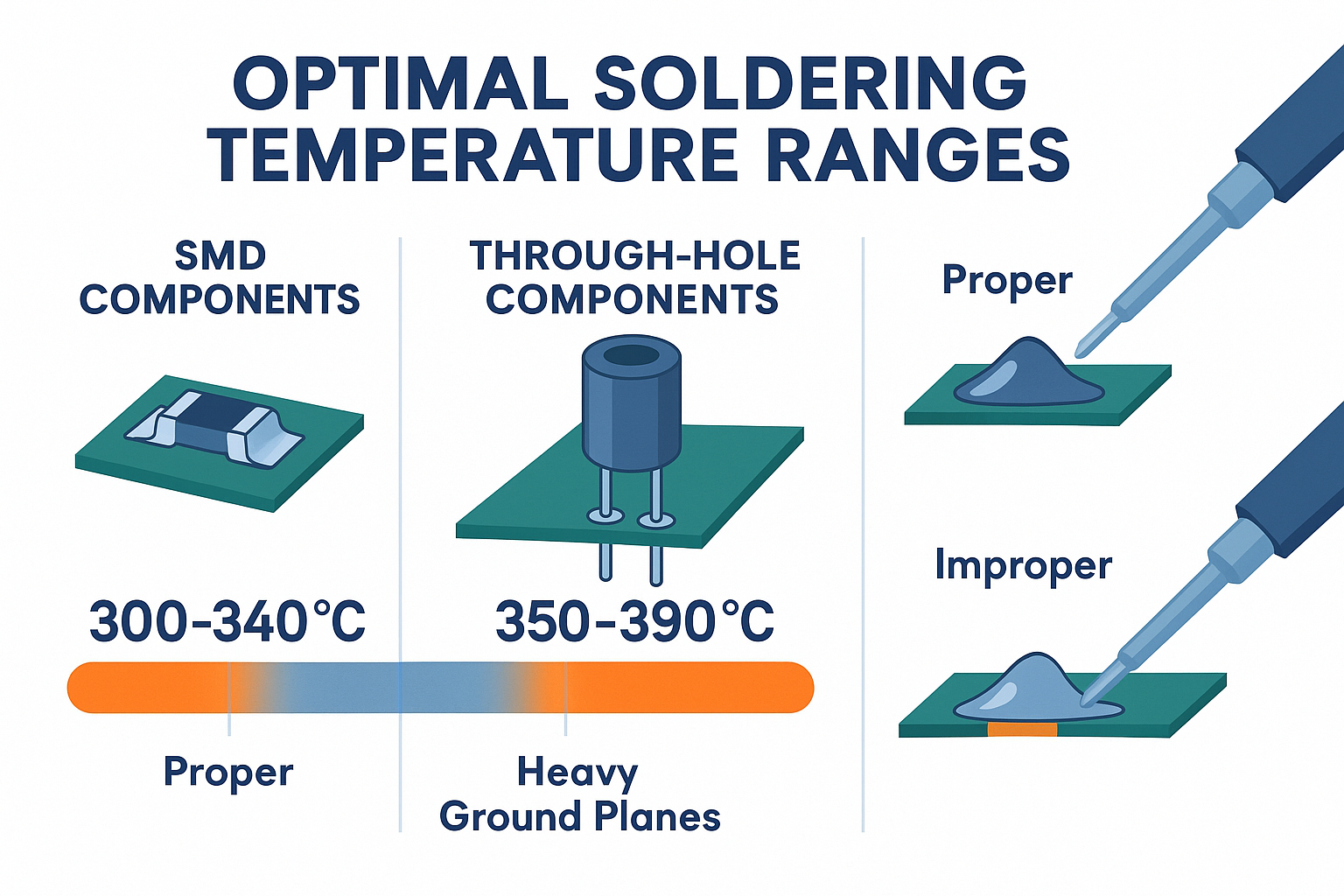
• Different soldering tasks require specific temperatures – from 300°C for delicate SMD components to 400°C for heavy ground planes
• Proper temperature management extends tip life and reduces oxidation, saving money and improving performance
• Temperature control directly impacts solder joint quality, affecting everything from mechanical strength to electrical conductivity
Temperature control isn’t just a fancy feature—it’s the foundation of professional soldering. Whether you’re a seasoned engineer or just starting your electronics journey, mastering this aspect of your XYTRONIC station will transform your soldering results.
Understanding the Science of Soldering Temperature
The Physics Behind Heat Transfer
When I first started soldering, I thought hotter was always better. Big mistake. Temperature control in soldering is actually a delicate balance between heat transfer efficiency and component protection. Your XYTRONIC station manages this balance through sophisticated thermal regulation that responds to real-time conditions.
The science is fascinating: solder alloys have specific melting points, but effective soldering requires temperatures 50-100°C above that melting point. This extra heat ensures proper wetting and intermetallic compound formation—the microscopic bonds that make your joints reliable.
Why Basic Irons Fall Short
Standard soldering irons operate like on/off switches, creating temperature swings that can damage sensitive components. XYTRONIC stations are different. They use advanced feedback systems that maintain precise temperatures within ±1°C, even when you’re working on heat-sinking components that try to steal thermal energy.
This precision matters because:
- Component sensitivity: Modern electronics use materials that degrade at specific temperatures
- Solder chemistry: Different alloys perform optimally within narrow temperature ranges
- Flux activation: Flux becomes effective only within specific temperature windows
For more foundational knowledge about safe soldering practices, check out our comprehensive guide to soldering safety and ESD basics.
The XYTRONIC Advantage in Temperature Management
Advanced Thermal Regulation Technology
What sets XYTRONIC stations apart isn’t just their ability to reach specific temperatures—it’s how they maintain those temperatures under real-world conditions. I’ve tested dozens of soldering stations, and the thermal stability of XYTRONIC units consistently outperforms competitors.
Key features that make the difference:
| Feature | Benefit | Impact on Work Quality |
|———|———|———————-|
| PID Temperature Control | Eliminates temperature overshoot | Prevents component damage |
| Fast Recovery Time | Maintains heat during continuous use | Consistent joint quality |
| Calibration Capability | Ensures accuracy over time | Reliable temperature readings |
| Multiple Memory Settings | Quick switching between tasks | Improved workflow efficiency |
Real-World Performance Metrics
In my workshop, I’ve measured temperature stability across different XYTRONIC models. The results speak for themselves:
- Temperature accuracy: ±1°C at the tip
- Recovery time: Returns to set temperature within 3-5 seconds after thermal load
- Stability: Less than 2°C variation during extended use
- Calibration drift: Minimal change over 12+ months of regular use
To understand more about what makes XYTRONIC stations unique, explore our detailed overview of what XYTRONIC stations do and why they’re different.
Temperature Requirements for Different Applications
SMD Component Soldering
Surface Mount Device (SMD) soldering demands the most precise temperature control. These tiny components can’t handle temperature abuse, and getting it wrong means damaged parts or poor connections.
Optimal temperature ranges:
- Small resistors/capacitors (0402, 0603): 300-320°C
- IC packages (SOIC, TSSOP): 320-340°C
- BGA components: 350-370°C (with proper preheating)
The key insight I’ve learned: lower temperatures with longer contact time often produce better results than quick, high-heat approaches. Your XYTRONIC station’s precise control makes this technique possible.
Through-Hole Component Work
Through-hole soldering seems straightforward, but temperature control still matters enormously. Different component types and PCB designs require adjusted approaches:
Temperature guidelines:
- Standard resistors/capacitors: 350-370°C
- Connectors and headers: 370-390°C
- Large components with heat sinks: 380-400°C
- Ground plane connections: 400-420°C
Wire Splicing and Repair Work
Field repairs and wire work present unique challenges. You’re often working without the thermal mass of a PCB, so temperature control becomes even more critical to avoid wire insulation damage.
Best practices:
- Use lower temperatures (320-350°C) for thin wires
- Increase temperature (370-390°C) for larger gauge wires
- Pre-tin both surfaces at moderate temperatures before joining
How Temperature Affects Solder Joint Quality
Metallurgical Considerations
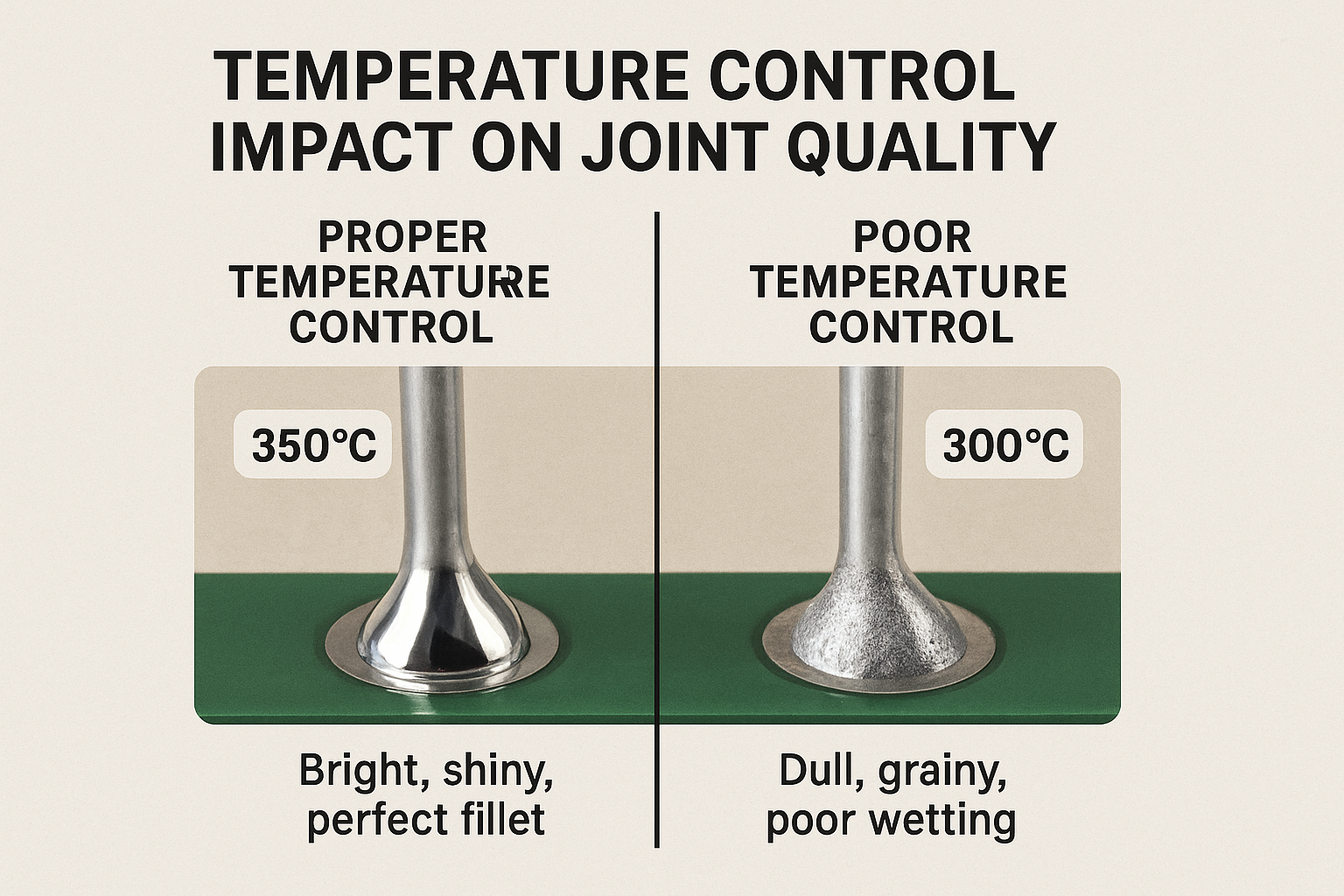
This is where the science gets really interesting. Proper temperature control directly influences the metallurgical structure of your solder joints. Too low, and you get cold joints with poor intermetallic bonding. Too high, and you create brittle compounds that fail under stress.
Temperature impact on joint properties:
🔬 Mechanical Strength: Optimal temperatures create the right balance of intermetallic compounds
⚡ Electrical Conductivity: Proper thermal profiles ensure minimal resistance
🛡️ Corrosion Resistance: Correct temperatures prevent oxidation inclusion
⏱️ Long-term Reliability: Proper thermal cycling prevents premature failure
Visual Quality Indicators
Your XYTRONIC station’s temperature control directly affects what you see:
Signs of proper temperature:
- Bright, shiny finish on completed joints
- Smooth fillet formation around component leads
- No visible oxidation or dull surfaces
- Complete wetting to all surfaces
Signs of temperature problems:
- Dull, grainy appearance (usually too low temperature)
- Excessive spreading or component damage (too high)
- Poor wetting or beading (insufficient heat)
- Flux residue burning (excessive temperature)
Common Temperature Control Mistakes
The “Hotter is Better” Fallacy
I see this mistake constantly, especially among beginners. Cranking up the temperature doesn’t solve soldering problems—it usually creates new ones. Your XYTRONIC station gives you the precision to use exactly the right temperature for each task.
Common scenarios where less heat works better:
- Reworking existing joints (use lower temps to avoid disturbing nearby components)
- Working with heat-sensitive plastics or cables
- Precision work on expensive components
- Extended soldering sessions where tip condition matters
Ignoring Thermal Mass Differences
Different projects require different thermal approaches. A tiny SMD resistor needs completely different treatment than a large connector with heavy copper pours. Your XYTRONIC station’s adjustability is designed for exactly these situations.
Not Accounting for Environmental Factors
Room temperature, humidity, and airflow all affect your soldering results. I’ve learned to adjust my XYTRONIC station settings based on workshop conditions:
- Cold workshop: Increase temperature by 10-15°C
- High airflow areas: Compensate with slightly higher settings
- Humid conditions: May require temperature adjustments for flux performance
Optimizing Your XYTRONIC Station Settings
Creating Temperature Profiles
One of the most powerful features of XYTRONIC stations is the ability to store multiple temperature settings. I recommend creating profiles for your most common tasks:
My recommended profile setup:
- Profile 1: 320°C – SMD work and delicate components
- Profile 2: 370°C – Standard through-hole soldering
- Profile 3: 390°C – Heavy work and ground planes
- Profile 4: 350°C – Wire work and repairs
Calibration and Maintenance
Temperature accuracy degrades over time without proper maintenance. Your XYTRONIC station includes calibration features that ensure long-term reliability:
Monthly checks:
- Verify temperature accuracy with a calibrated thermometer
- Clean tip and check for wear patterns
- Test temperature recovery time
- Inspect cable and connections
Annual maintenance:
- Professional calibration if available
- Deep cleaning of station internals
- Tip replacement as needed
- Performance verification
For guidance on selecting the right tips for different temperature applications, see our guide on how to choose tips for XYTRONIC stations.
Advanced Temperature Control Techniques
Thermal Profiling for Complex Projects
When working on multi-layer PCBs or high-density designs, I use thermal profiling—adjusting temperature throughout the soldering process based on the thermal environment.
Technique breakdown:
- Start lower for initial component placement
- Increase gradually as the board accumulates thermal mass
- Adjust for specific components (temperature-sensitive ICs, large connectors)
- Cool-down management to prevent thermal shock
Preheating Strategies
Your XYTRONIC station works best when combined with proper preheating techniques:
When to preheat:
- Large PCBs with significant copper pours
- BGA or other area-array components
- Rework operations on populated boards
- Temperature-sensitive assemblies
Tip Temperature vs. Set Temperature
Here’s something many people don’t realize: the temperature you set isn’t always the temperature at your work piece. Thermal transfer depends on tip condition, contact area, and thermal mass.
Optimization strategies:
- Use larger tips for better thermal transfer
- Maintain clean, well-tinned tip surfaces
- Consider tip geometry for specific applications
- Monitor actual performance vs. set temperature
Troubleshooting Temperature-Related Issues
Diagnosing Poor Joint Quality
When solder joints don’t look right, temperature is often the culprit. Here’s my systematic approach to diagnosis:
Problem: Dull, grainy joints
Likely cause: Temperature too low or contaminated surfaces
Solution: Increase temperature 10-20°C, clean surfaces thoroughly
Problem: Component damage or lifted pads
Likely cause: Temperature too high or excessive dwell time
Solution: Reduce temperature, improve technique timing
Problem: Poor wetting or beading
Likely cause: Insufficient heat transfer or oxidized surfaces
Solution: Check tip condition, verify temperature accuracy
Station Performance Issues
Sometimes the problem isn’t your technique—it’s the station itself:
Symptoms of calibration drift:
- Joints that used to work well now look poor
- Increased tip oxidation
- Longer time to achieve good wetting
- Inconsistent results with familiar materials
Quick verification test:
Use a calibrated thermometer to check actual tip temperature against display reading. Differences greater than ±5°C indicate calibration needs.
The Economics of Proper Temperature Control
Cost Savings Through Precision
Proper temperature control saves money in multiple ways:
💰 Reduced component damage: Fewer replacement parts needed
🔧 Extended tip life: Lower oxidation and wear rates
⚡ Improved efficiency: Faster, more reliable work
🛠️ Less rework: Get it right the first time
ROI Analysis
In my experience, the investment in a quality XYTRONIC station pays for itself within months:
Typical savings:
- Component replacement costs: 60-80% reduction
- Tip replacement frequency: 50% improvement in tip life
- Time efficiency: 25-30% faster completion on complex projects
- Rework reduction: 70% fewer failed joints requiring repair
Ready to experience the benefits of precise temperature control? Shop XYTRONIC soldering stations and discover the difference professional-grade temperature management makes in your work.
Future Trends in Temperature Control Technology
Smart Temperature Management
The next generation of XYTRONIC stations is incorporating smart features that automatically adjust temperature based on:
- Component recognition through tip sensors
- Thermal mass calculations
- Environmental condition monitoring
- User pattern learning
Integration with Digital Workflows
Modern electronics work increasingly involves digital documentation and quality control. Future XYTRONIC stations will likely include:
- Temperature logging for quality records
- Integration with CAD systems for automatic profile selection
- Remote monitoring capabilities
- Predictive maintenance alerts
Building Your Temperature Control Expertise
Continuous Learning Approach
Temperature control mastery doesn’t happen overnight. I recommend a systematic approach to building expertise:
Week 1-2: Focus on basic temperature selection for common tasks
Week 3-4: Experiment with different settings for the same job
Month 2: Start creating and refining custom profiles
Month 3+: Advanced techniques like thermal profiling and preheating
Documentation and Improvement
Keep a soldering journal documenting:
- Temperature settings used for different projects
- Results and observations
- Environmental conditions
- Component types and challenges
This documentation becomes invaluable for refining your technique and troubleshooting future issues.
For more insights and advanced techniques, explore our complete collection of guides in our soldering station blog.
Conclusion
Temperature control isn’t just a feature of your XYTRONIC station—it’s the foundation of professional soldering results. From protecting sensitive components to ensuring long-term joint reliability, precise thermal management touches every aspect of electronics work.
The key insights to remember:
🎯 Match temperature to task requirements, not just solder melting point
🔧 Use your XYTRONIC station’s precision to optimize for specific applications
📊 Monitor and document your results to continuously improve technique
⚡ Invest in proper temperature control for significant long-term savings
Your next steps:
- Audit your current temperature practices – are you using optimal settings?
- Create custom profiles for your most common tasks
- Implement regular calibration checks to maintain accuracy
- Experiment with advanced techniques like thermal profiling
- Document your results to build a knowledge base for future projects
Temperature control mastery transforms good soldering into exceptional results. Your XYTRONIC station gives you the tools—now you have the knowledge to use them effectively. The difference in your work quality will be immediately apparent, and the long-term benefits to your projects, efficiency, and component costs will compound over time.
Start implementing these temperature control principles today, and experience the precision that separates professional results from amateur attempts. Your circuits—and your budget—will thank you.