
Picture this: You’re hunched over a cramped workbench, your soldering iron cord tangled around components, and there’s barely enough room to maneuver your project without knocking over flux bottles. Sound familiar? Space constraints are one of the biggest challenges facing electronics engineers and hobbyists in 2025, especially as workspaces become smaller and more shared.
Whether you’re working from a home office, a university lab, or a classroom setting, optimizing your bench footprint while maintaining professional-grade capabilities isn’t just about convenience—it’s about productivity, safety, and the quality of your work. The right approach to workspace organization can transform a cluttered, frustrating environment into an efficient soldering station that rivals much larger setups.
Key Takeaways
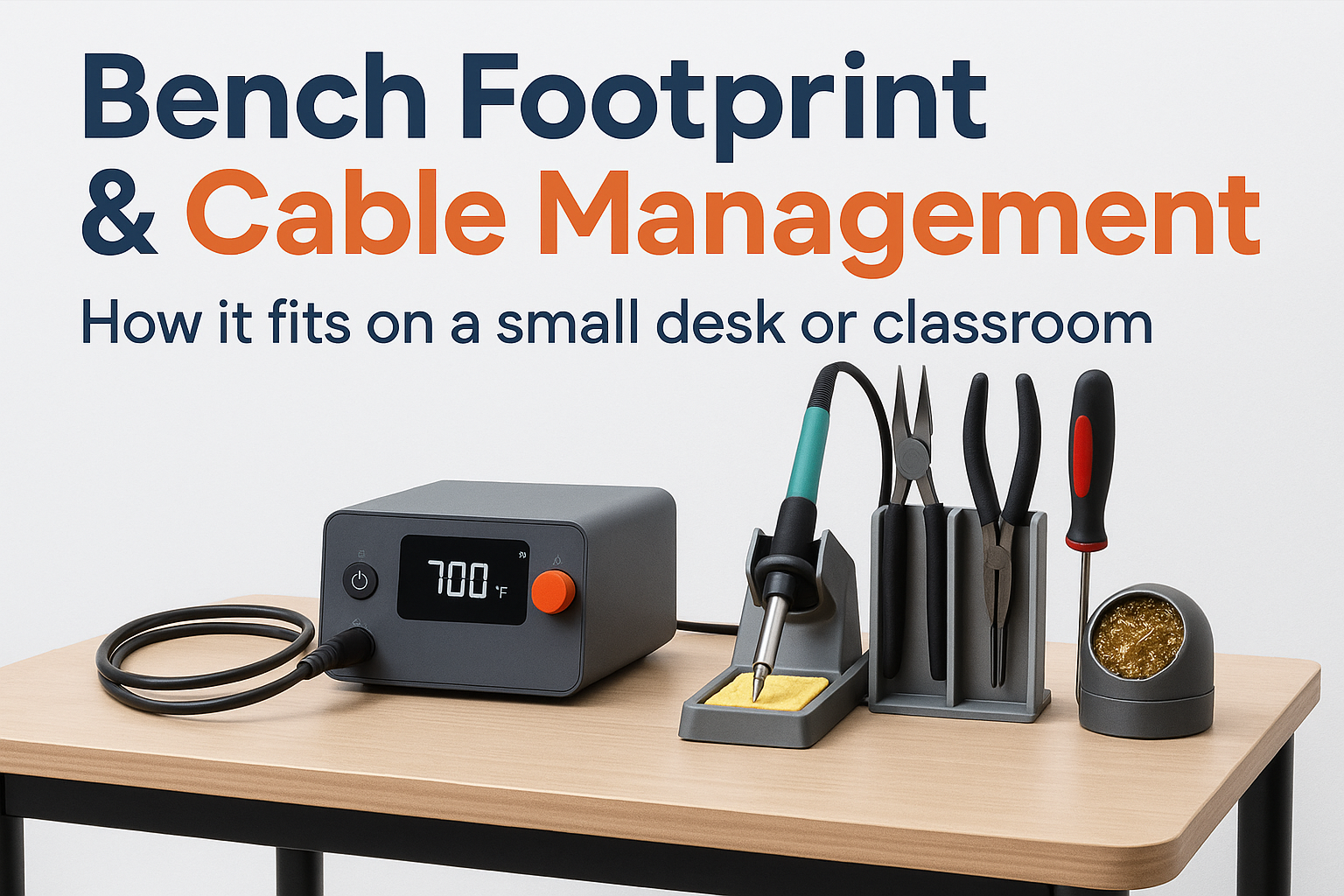
• Compact soldering stations can deliver professional performance while occupying minimal desk space through smart design and vertical storage solutions
• Proper cable management reduces workspace clutter by up to 70% and significantly improves safety and workflow efficiency
• Strategic placement of your soldering station considering heat zones, ventilation, and accessibility maximizes both safety and productivity
• Multi-functional accessories like integrated stands and tool holders can eliminate the need for separate workspace elements
• Classroom and shared workspace considerations require additional focus on quick setup/teardown and standardized organization systems
Understanding Bench Footprint Requirements
What Constitutes an Optimal Footprint? 📏
When we talk about bench footprint, we’re referring to the total desk space your soldering setup occupies—not just the station itself, but all the supporting equipment, tools, and workspace you need for effective operation.
A typical professional soldering setup traditionally required:
- 12-18 inches of linear bench space
- 8-12 inches of depth
- Additional 6-8 inches for tool storage and components
However, modern compact designs have revolutionized these requirements. Today’s efficient setups can operate effectively in as little as 8×6 inches of primary space, with vertical storage handling the rest.
Space-Critical Environments
Small Home Offices: With remote work becoming permanent for many engineers, home workspace optimization is crucial. Limited desk real estate must accommodate not just soldering equipment, but computers, documentation, and other tools.
University Labs: Student workstations typically offer 18-24 inches of bench space that must accommodate multiple projects, textbooks, and shared equipment.
Classroom Settings: Educational environments require quick setup and teardown capabilities, with storage solutions that keep expensive equipment secure between sessions.
Shared Makerspaces: Community workshops demand equipment that can be easily relocated and doesn’t monopolize valuable bench space.
Modern Soldering Station Design Philosophy
Vertical Integration and Smart Layouts
The evolution of soldering station design has prioritized vertical space utilization over horizontal spread. Modern units integrate multiple functions into compact towers rather than spreading components across your bench.
Key Design Elements:
- Integrated tool storage within the station housing
- Stackable accessories that build upward, not outward
- Swing-arm designs that keep tools accessible but out of the way
- Magnetic holders that utilize vertical surfaces
Heat Management in Confined Spaces 🔥
Working in tight quarters requires careful consideration of thermal zones. Your soldering station generates significant heat, and proper placement ensures both safety and component longevity.
Critical Spacing Requirements:
- Minimum 3 inches clearance on sides with ventilation ports
- 6+ inches above the station for heat dissipation
- Heat-sensitive materials should be positioned at least 12 inches away
- Airflow patterns must be considered in enclosed spaces
Understanding temperature control principles becomes even more important in space-constrained environments where heat buildup can affect nearby components.
Cable Management Strategies
The Hidden Space Killer
Poor cable management is often the biggest space waster in compact setups. A single unmanaged power cord can effectively double your required footprint, while multiple cables can make your workspace virtually unusable.
Professional Cable Routing Techniques
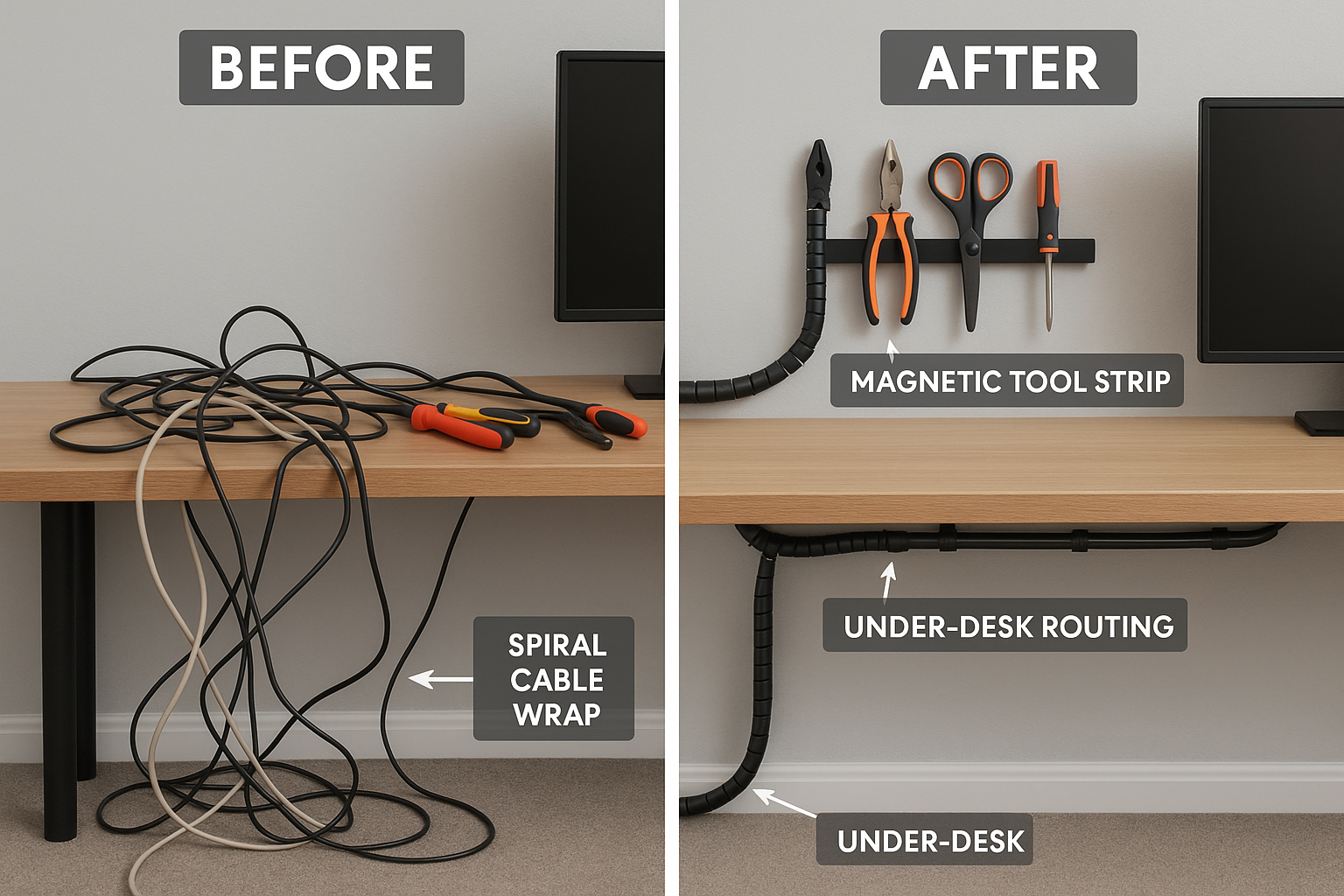
Under-Desk Routing: Mount cable trays or adhesive guides underneath your work surface to keep power and data cables completely out of your workspace.
Spiral Cable Management: Use spiral cable wrap to bundle multiple cables into a single, manageable run that follows the edge of your workspace.
Retractable Systems: Spring-loaded cable reels keep excess cord length managed automatically, extending only what you need for current projects.
Magnetic Cable Holders: Strategic placement of magnetic cable clips on metal surfaces keeps frequently-used cables accessible but organized.
Cable Safety in Compact Spaces
In tight quarters, cable management isn’t just about organization—it’s about safety. Proper routing prevents:
- Accidental disconnections during critical soldering operations
- Heat damage from cables contacting hot surfaces
- Trip hazards in shared workspace environments
- Electromagnetic interference between power and signal cables
The ergonomic considerations of cable flexibility become crucial when working in confined spaces where cable tension can affect precision work.
Small Desk Optimization Techniques
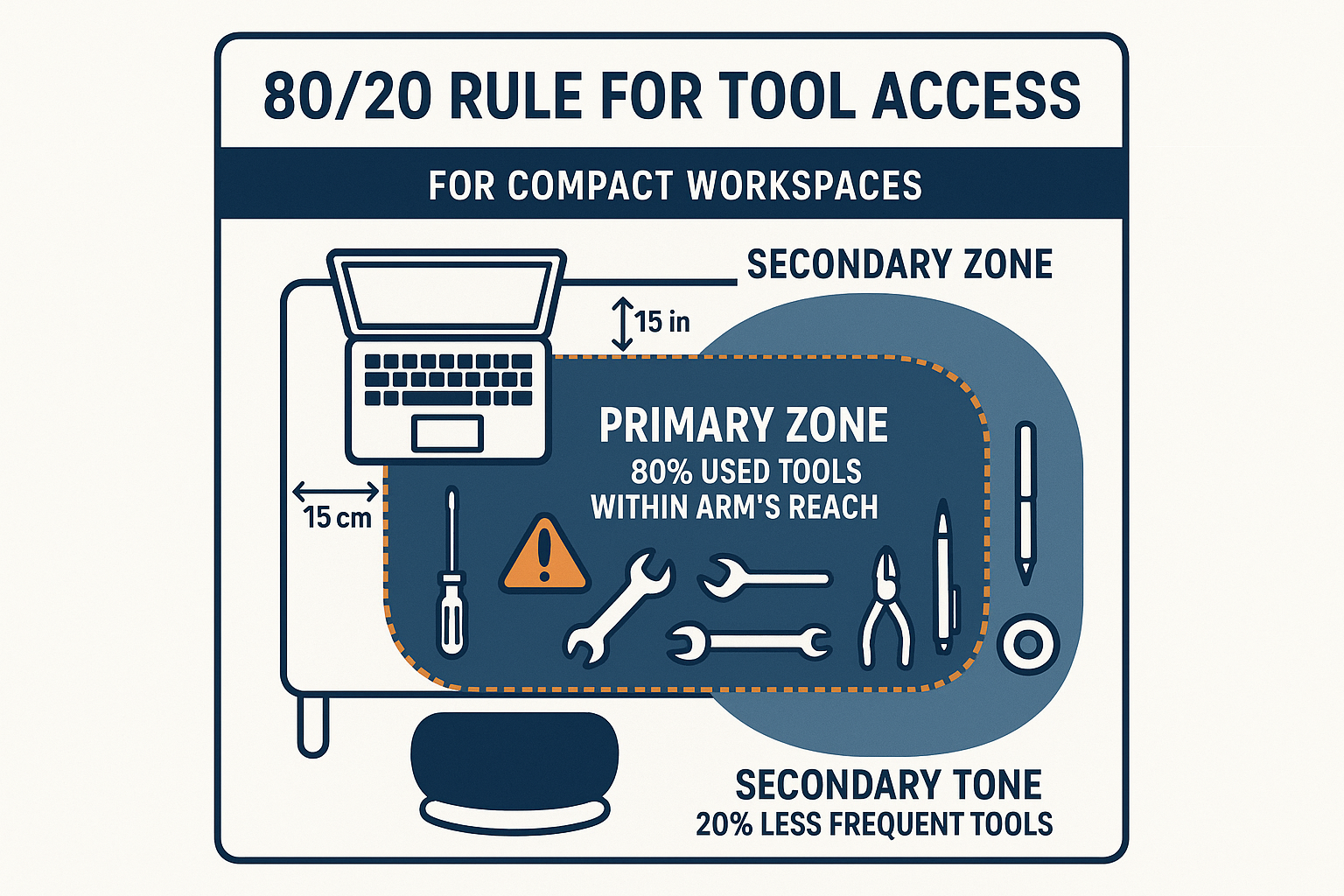
The 80/20 Rule for Tool Access
In compact workspaces, applying the 80/20 principle means keeping the tools you use 80% of the time within immediate reach, while storing less-frequent items in secondary locations.
Primary Zone (within arm’s reach):
- Soldering iron and stand
- Most commonly used tips
- Flux and cleaning supplies
- Primary multimeter
Secondary Zone (requiring minor movement):
- Tip storage and changers
- Component organizers
- Reference materials
- Backup supplies
Multi-Level Organization Systems
Tier 1 – Desk Surface: Only active project materials and primary tools
Tier 2 – Elevated Storage: Frequently accessed supplies on risers or shelves
Tier 3 – Overhead/Wall: Reference materials and backup equipment
Tier 4 – Drawer/Cabinet: Bulk supplies and specialized tools
Modular Workspace Design
Creating a modular system allows you to reconfigure your space based on current project needs:
| Module Type | Footprint | Primary Function | Quick-Change Capability |
|————-|———–|——————|————————|
| Soldering Platform | 6″x8″ | Primary work area | Fixed position |
| Component Staging | 4″x6″ | Active components | Removable trays |
| Tool Storage | 3″x8″ | Hand tools | Magnetic strips |
| Documentation | 8″x4″ | Schematics/guides | Folding stands |
Classroom and Educational Considerations
Quick Setup and Teardown Systems ⏱️
Educational environments require equipment that can transition from storage to full operation in under 5 minutes. This demands careful consideration of:
Storage Integration: Equipment should store in the same configuration it operates, minimizing setup time.
Power Management: Quick-connect power systems with integrated cable storage eliminate the time spent untangling cords.
Tool Organization: Color-coded or labeled systems help students quickly identify and return tools to proper locations.
Safety Protocols: ESD safety considerations become critical in educational settings where multiple users may not follow consistent grounding procedures.
Standardization for Multiple Users
Consistent Layouts: Every workstation should have identical organization, allowing students to work efficiently regardless of their assigned location.
Universal Tool Placement: Common tools should always be in the same relative position across all stations.
Clear Labeling: Visual indicators help maintain organization and speed up equipment identification.
Damage Prevention: Robust storage solutions protect expensive equipment from student handling errors.
Budget-Conscious Solutions for Educational Settings
Educational institutions often require maximum functionality at minimum cost. This drives specific design priorities:
- Durability over aesthetics: Equipment must withstand heavy use
- Repair-friendly designs: Easy maintenance reduces long-term costs
- Standardized components: Common parts across multiple units simplify inventory
- Energy efficiency: Auto-sleep and shutoff features reduce operational costs
Advanced Space-Saving Solutions
Integrated Workstation Design
The most effective compact setups integrate multiple functions into single units:
All-in-One Platforms: Combine soldering station, component storage, tool holders, and work surface into unified systems.
Fold-Out Extensions: Temporary work surfaces that extend when needed and fold away for storage.
Rotating Tool Carousels: Vertical storage that brings tools to you rather than requiring you to reach for them.
Technology Integration
Modern compact workstations leverage technology to maximize efficiency:
Digital Documentation: Tablet mounts eliminate paper schematic storage needs
Component Databases: Digital inventory systems reduce physical storage requirements
Remote Monitoring: Temperature and usage tracking optimize equipment placement
Automated Tool Return: Magnetic or spring-loaded systems ensure tools return to proper positions
Custom Solutions for Unique Constraints
Sometimes standard solutions don’t address specific space limitations:
Corner Workstations: Triangular designs that utilize typically wasted corner space
Wall-Mounted Systems: Fold-down workbenches that disappear when not in use
Mobile Platforms: Rolling carts that can be stored elsewhere when not needed
Shared Resource Systems: Central tool storage with individual work areas
Measuring Success: Efficiency Metrics
Quantifying Workspace Effectiveness
Setup Time: How quickly can you transition from storage to full operation?
Tool Access Time: Average time to locate and retrieve any needed tool
Project Transition Speed: Time required to switch between different projects
Safety Incident Rate: Frequency of accidents or near-misses in your workspace
Productivity Indicators
Work Quality: Does space constraint affect your soldering precision or consistency?
Project Completion Rate: Are you finishing projects faster or slower than in larger spaces?
Stress Levels: How does workspace organization affect your enjoyment of the hobby?
Learning Curve: For educational settings, how quickly do new users become productive?
Future Trends in Compact Workspace Design
Emerging Technologies
Wireless Power Delivery: Eliminating power cords entirely through inductive charging systems
Augmented Reality Guidance: Overlay systems that provide visual tool location and procedure guidance
Smart Storage: RFID-tagged tools with automated inventory tracking
Adaptive Surfaces: Workbenches that reconfigure automatically based on detected project types
Sustainability Considerations ♻️
Compact workspace design increasingly considers environmental impact:
Energy Efficiency: Smaller spaces require less heating and cooling
Material Optimization: Reduced equipment footprints mean less manufacturing material
Longevity Design: Durable, repairable equipment reduces replacement frequency
Shared Resource Models: Community workshops reduce individual equipment needs
Troubleshooting Common Space Issues
Overcrowding Symptoms and Solutions
Problem: Tools constantly getting knocked over or lost
Solution: Implement magnetic tool strips and designated zones for each item
Problem: Cables interfering with work area
Solution: Install under-desk cable management and retractable cord systems
Problem: Insufficient lighting in compact setup
Solution: Add articulating LED task lights that don’t consume desk space
Problem: Heat buildup affecting nearby components
Solution: Relocate heat-sensitive items and improve ventilation pathways
Workflow Optimization
Identify Bottlenecks: Track which activities require the most movement or setup time
Eliminate Redundancy: Remove duplicate tools or supplies that consume space without adding value
Optimize Frequency: Place most-used items in most accessible locations
Plan for Growth: Design systems that can accommodate additional tools or larger projects
Making the Investment Decision
When considering a compact soldering station setup, several factors justify the investment:
Space Rental Costs: In expensive urban markets, every square foot of workspace has real monetary value
Productivity Gains: Efficient organization can reduce project time by 15-25%
Safety Improvements: Proper cable management and tool storage significantly reduce accident risk
Equipment Longevity: Organized storage and proper spacing extend tool life
Professional Image: Clean, organized workspaces reflect positively on your capabilities
For those ready to upgrade their workspace efficiency, consider exploring professional-grade compact soldering stations that prioritize both performance and space optimization. The right equipment investment can transform even the smallest workspace into a highly productive environment.
Conclusion
Mastering bench footprint and cable management in small spaces isn’t just about making do with less—it’s about creating more efficient, safer, and more enjoyable work environments. Whether you’re an electronics engineer working from home, a student in a crowded lab, or an educator managing multiple workstations, the principles of compact workspace design can dramatically improve your productivity and results.
The key lies in understanding that vertical space utilization, smart cable routing, and modular organization can deliver professional capabilities in surprisingly small footprints. Modern soldering stations designed with space constraints in mind offer features that would have been impossible in larger, older equipment.
Your next steps:
- Audit your current setup – Measure your actual space usage and identify inefficiencies
- Prioritize your tools – Apply the 80/20 rule to determine what needs immediate access
- Implement cable management – Start with under-desk routing and magnetic holders
- Consider vertical solutions – Look for opportunities to build up rather than out
- Plan for flexibility – Design systems that can adapt as your needs change
Remember, the goal isn’t just to fit more into less space—it’s to create a workspace that enhances your capabilities while reducing stress and safety concerns. With thoughtful planning and the right equipment choices, your compact workspace can rival much larger setups in both functionality and professional results.
For more insights on optimizing your soldering setup, explore our comprehensive soldering station blog with detailed guides on everything from safety basics to advanced tip selection.